
Team capacity planning for small studios: the 5-person rule
Published April 30, 2026 · Updated September 22, 2026
Updated May 2026: EverGantt is now a web app you can use on any browser, this post has been updated to match.
If you run a small studio, five people, six, maybe a dozen, and you’ve ever opened a Gantt chart at the end of a sprint and realized one person was effectively at 130% capacity for three weeks while another was at 40%, this post is for you.
The mistake isn’t the tool. The mistake is treating capacity as something you discover retrospectively instead of something you allocate.
The 5-person rule
In a studio under ~7 people, the bottleneck is always one specific person, and you almost always know who it is before the project starts. It’s the senior dev, the ex-CTO, the founder-coder. They get pulled into 60% of the tickets that have ambiguity.
Capacity planning at this scale is not “balance the load across the team.” That’s a 50-person problem. At 5–7 people, capacity planning is “protect the bottleneck.”
What this looks like concretely
When you draw the chart:
- Pick the bottleneck person and assign them only the tasks they uniquely have to do.
- Assign everything else to anyone but them, even if it’s slower.
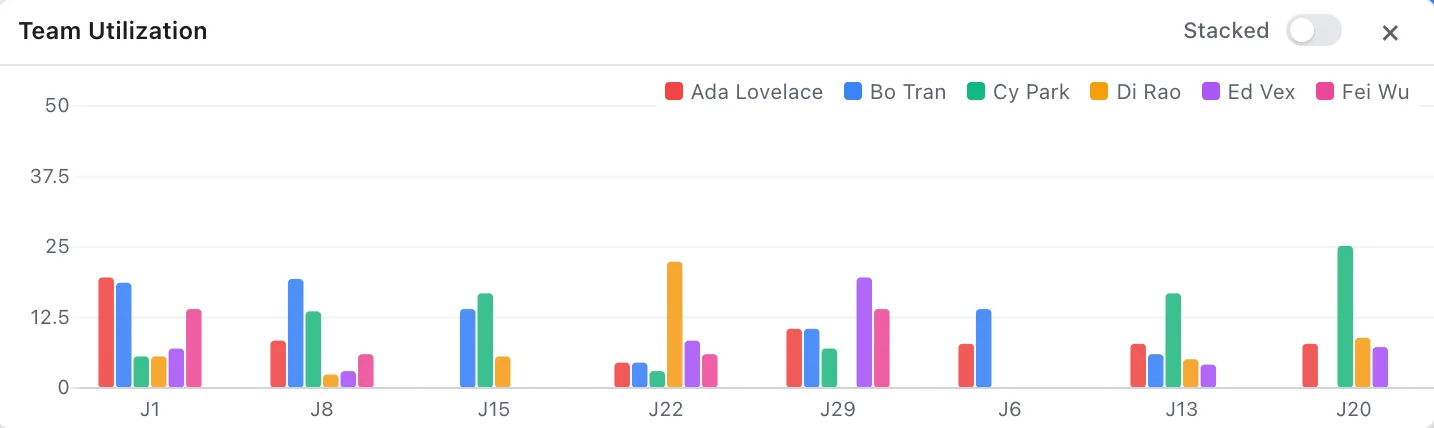
- The bottleneck’s row in the utilization panel should sit at ~70%, not 100%. The 30% buffer is for the inevitable midweek “I just need 20 minutes of your time.”
- If you can’t get the bottleneck below 100% on paper, the project is already late. Cut scope or move dates now, before the chart turns into fiction.
Most planning tools default to “show the load.” That’s necessary but not sufficient, you also need to be able to reassign a task in two clicks once you see the overload, without leaving the chart and opening a separate resource view. This is the real reason EverGantt’s capacity panel lives in the same window as the Gantt: every tool that requires switching views to reassign work just doesn’t get used in week 3. (For a video studio, the video production template caps the editor’s weekly hours, so you can see this in action on a real schedule.)
With EverGantt’s Team plan, you invite the whole studio directly, everyone sees the same chart in the browser, and the capacity panel updates in real time as you reassign tasks. Team covers up to five people under one flat monthly price rather than a per-seat bill (see pricing).
The math, briefly
A 5-person team at 40 productive hours/week (already optimistic) is 200 hours/week. A typical 8-week project is 1600 person-hours. If your bottleneck person is on 60% of tickets, they personally need to absorb ~960 hours over 8 weeks, but they only have 320. The math fails before you start.
This is why the question isn’t “how do I fit more on the chart” but “what do I cut so the bottleneck has air.”
A 10-minute weekly habit
Every Friday afternoon, open the chart in your browser. Look at the next two weeks for the bottleneck person only. If their stack is over 70% utilized, move one task off them, to someone else, to next sprint, or to “nope, not happening.” Then close the tab.
That’s it. That’s the practice. Small studios don’t need resource-leveling algorithms; they need 10 minutes a week and the discipline to actually move things off the bottleneck before the bottleneck goes home for the weekend angry.
If you want to see this in action, EverGantt’s capacity panel does exactly this: stacked weekly hours per teammate, drag-and-drop reassignment, no separate view to open. Free to build and export; the Team plan brings the whole studio into the same live chart.
Start free in your browser. Related: real-time vs. status-report project management · the project features small teams actually use.
Frequently asked questions
How is team capacity planning different at a small studio?
At under ~7 people the bottleneck is almost always one specific person you can name before the project starts. Capacity planning at this scale isn't 'balance the load across the team', it's 'protect the bottleneck.'
What is the 5-person rule for capacity planning?
Assign the bottleneck person only the tasks they uniquely must do, push everything else to anyone but them, and keep their utilization around 70%, leaving a 30% buffer for interruptions. If you can't get them under 100% on paper, cut scope or move dates now.
Do small teams need resource-leveling software?
No. A 5–7 person studio needs about 10 minutes a week: open the chart, check the next two weeks for the bottleneck person, and move one task off them if they're over ~70%. Resource-leveling algorithms are a 50-person problem.