Best free Gantt chart software: 7 tools compared (2026)
Published May 26, 2026 · Updated September 25, 2026
Short answer: The best free Gantt chart software for a small team depends on where it has to run and how many people need to edit the plan. GanttProject and ProjectLibre are fully free desktop apps. ClickUp lets your whole team in for free, but Gantt is only a limited trial there. Notion suits teams that want docs and a timeline together. TeamGantt and Instagantt have free plans capped at one user. EverGantt is free in the browser with no account, export included, and you pay only for cloud save or live team editing. Every free-tier limit below was checked against the vendor’s own pricing or feature pages in September 2026.
What should you look for in a free Gantt tool?
Check five things before you pick: where the tool runs, whether dependencies actually move work, what team use costs, what you can export, and where the free tier stops. Between them they cover most of the surprises people hit in the first week.
- Where it runs. A browser tool works on any computer with nothing to install. A desktop app works offline, but someone has to install and update it on every machine.
- Real dependencies. When one task slips, do the tasks after it move? Or are the bars colored blocks you drag by hand?
- Team use. Some free plans are one user only. Others let the whole team in but cap the Gantt view itself.
- Export. PNG and PDF matter for decks and client updates. CSV matters when the plan has to end up in a spreadsheet.
- Where free stops. Project caps, task caps, trial-style usage limits, and which feature sits behind the first paid plan.
How do the free tiers compare?
The table puts all seven free tiers side by side.
| Tool | What’s free | Gantt on the free plan | Team use on free | Paid from |
|---|---|---|---|---|
| EverGantt | Build, edit, export, no account | Full, with dependencies | Solo (live co-editing on Team/Business) | Pro $3.99/mo (1 person); Team $15/mo (up to 5) |
| GanttProject | Whole desktop app, open source | Full, offline | Share files; co-editing via paid Cloud add-on | Cloud add-on, pay-as-you-go |
| ProjectLibre | Whole desktop app, open source | Full, MS Project-style | Share files; Cloud is paid | Cloud $9.99/user/mo (annual) |
| Notion | Unlimited blocks for 1 person | Timeline view* | Limited blocks once 2+ members | Plus $10/member/mo |
| ClickUp | Unlimited members, 60 MB storage | Limited-use trial | Unlimited members | Unlimited $7/user/mo (annual) |
| TeamGantt | 1 user, 1 project, 40 tasks | Full, 3 PDF exports | Solo only | Base $59/mo flat |
| Instagantt | 1 user, 3 Asana projects | Full; CSV and snapshot links | Solo only | Individual $10/mo (annual) |
Notion’s pricing page doesn’t say which plans include Timeline view. Details checked on September 25, 2026. Free tiers change often, so confirm before you move a team onto one.
EverGantt: best free browser-based Gantt
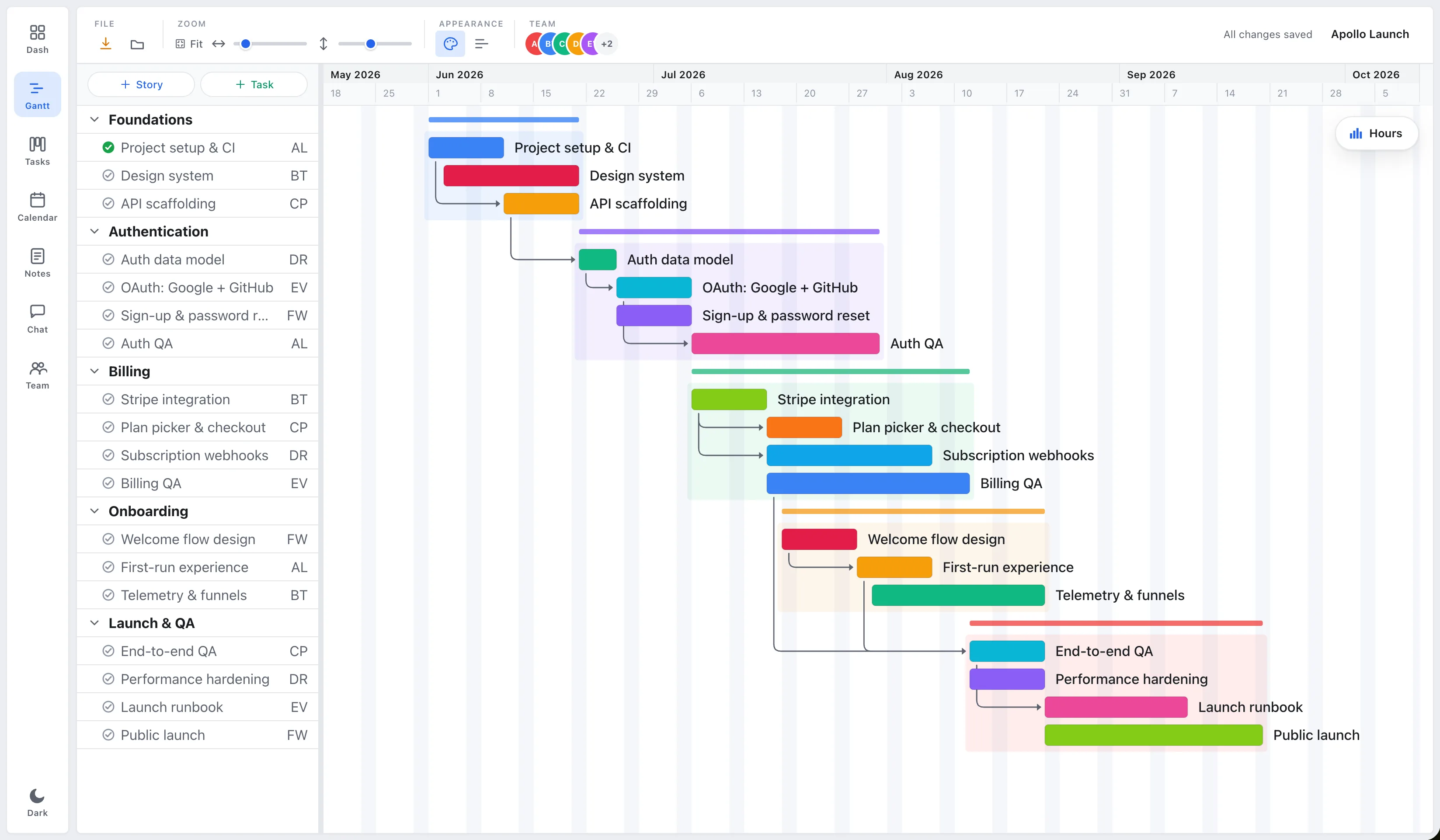
EverGantt is the pick if you want a real Gantt chart in the browser with nothing to install and no account to start. The free tier covers building, editing, and exporting to PNG, PDF, SVG, or CSV. Export runs in your browser, so nothing leaves your device until you choose to save.
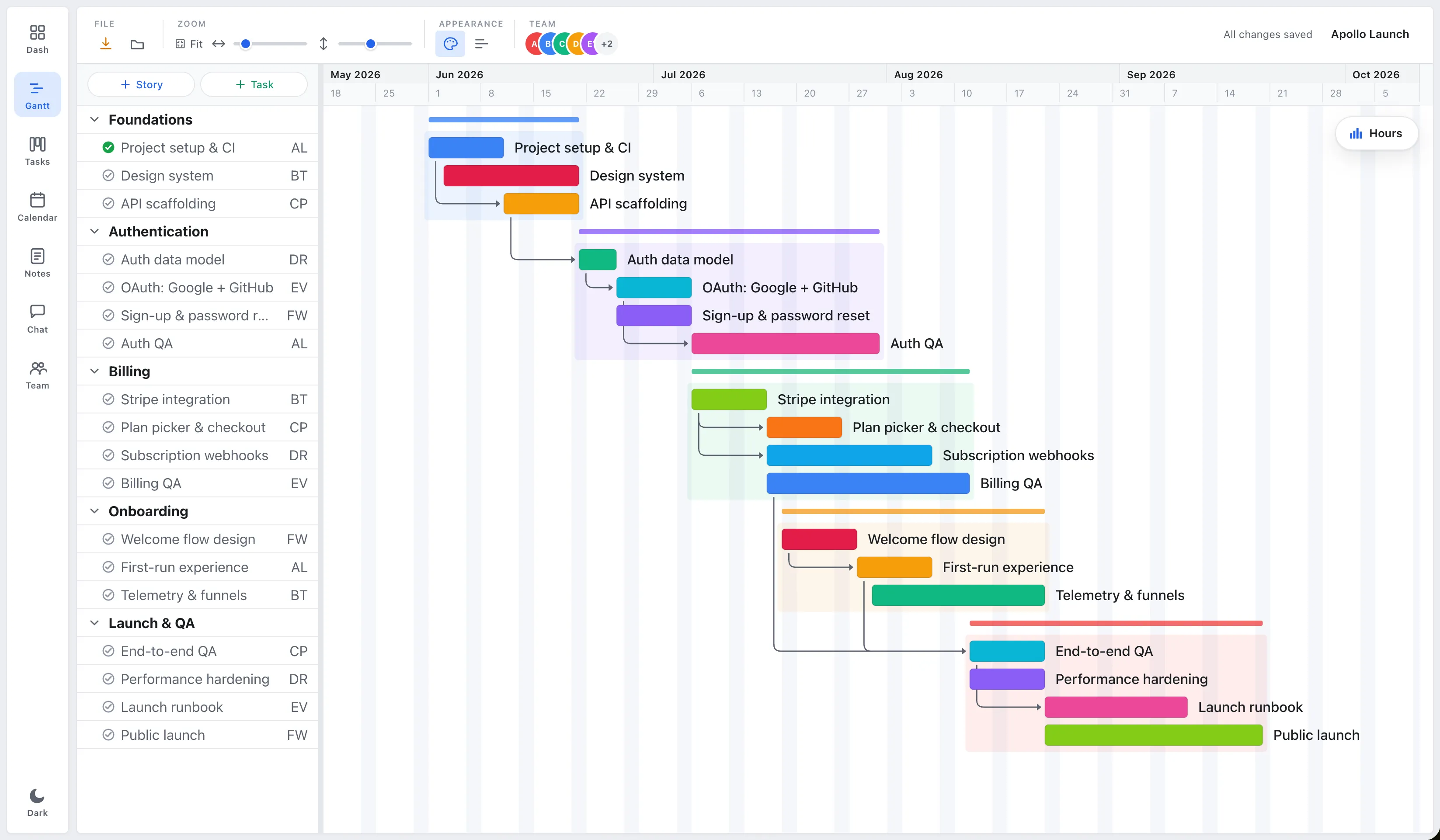
Dependencies push later tasks when one slips, and the same plan also shows as a board and a calendar. A team capacity view shows who’s overloaded, and the Gantt chart templates open with phases and dependencies already laid out.
Cloud save is paid, starting at Pro ($3.99 a month or $39 a year, for one person). Live co-editing is on Team ($15 a month for up to 5 people) and Business ($59 a month for up to 20). It also isn’t a heavy PMI suite: there are no baselines, earned value, or critical-path leveling.
Pick EverGantt if you want a browser Gantt with free export and a cheap flat price once the team joins.
GanttProject: best free offline desktop tool
GanttProject is the strongest option if you want a free Gantt tool that never needs the internet. It’s open source under the GPL, runs on Windows, macOS, and Linux, and works fully offline with no subscription.
As a traditional desktop scheduler it handles task dependencies, and it opens Microsoft Project files (MPX, MPP, and XML), which helps when a client sends you one. Exports include PDF, PNG, CSV, and MS Project XML.
Team use is where it falls short. The desktop app is single-user, so sharing means passing files around unless you pay for the GanttProject Cloud add-on, which is billed pay-as-you-go. Updates are also slow: the current stable release, 3.3, came out in January 2024, with a 3.4 beta listed on the site.
Pick GanttProject if you schedule alone, want zero cost forever, and don’t mind installing software. Details: ganttproject.biz.
ProjectLibre: best free Microsoft Project alternative
ProjectLibre is the free choice if you want something close to Microsoft Project without the license. The desktop app is open source, has no subscription, and runs on Windows, macOS, and Linux. The latest release, 1.9.8, shipped in April 2025.
It goes deeper than anything else on this list: critical path, resources, costs, baselines, and earned value. It opens .mpp files, imports Primavera P6 (.XER), and exports PDF and XML. If you come from a formal PM background, it’ll feel familiar.
That depth is also the downside for a small team. The interface is heavy, in the MS Project mold, and collaboration requires ProjectLibre Cloud, which is paid (Core is $9.99 per user per month, billed annually). The free desktop app is a single-user tool.
Pick ProjectLibre if you need critical path or earned value and you’re scheduling on your own. Details: projectlibre.com.
Notion: best for docs and a timeline together
Notion fits a team that wants the plan to live next to its docs and wiki. Its Timeline view lays database items out across dates, and you can draw dependency arrows between them so dates shift automatically when something moves.
The free plan is generous for one person, with unlimited blocks. For a team it’s tighter. Once a workspace has two or more members the block allowance becomes limited, file uploads cap at 5 MB, and page history only goes back 7 days. You can invite up to 10 guests. Notion’s pricing page doesn’t list which plans include Timeline view or dependencies, so check in your own workspace before you plan around them.
Notion isn’t built as a scheduler, and its help pages don’t mention critical path or baselines. Plus costs $10 per member per month.
Pick Notion if the docs matter as much as the schedule. Details: notion.com/pricing.
ClickUp: the whole team free, but Gantt is a trial
ClickUp’s Free Forever plan allows unlimited members and 60 MB of storage, which on paper makes it the most team-friendly free plan here. But its pricing page marks Gantt as a trial on Free, meaning a limited number of uses rather than permanent access.
While the trial lasts, the Gantt view is capable. ClickUp’s Gantt page says dependencies, drag-to-reschedule, and critical path work without upgrading, while baselines are paid only. ClickUp doesn’t publish the exact use count on its public pages, and third-party sources disagree, so treat the free Gantt as a test drive.
Unlimited, the first paid plan, costs $7 per user per month billed yearly or $10 billed monthly. For a five-person team that’s $35–$50 a month.
Pick ClickUp if you want a full task suite for the team and expect to pay once the Gantt habit sticks. Details: clickup.com/pricing.
TeamGantt: polished, but free is one project
TeamGantt is one of the most polished Gantt-first tools, and it still has a free plan. TeamGantt Personal is free forever for one user, one project, and up to 40 tasks, with dependencies and drag-and-drop scheduling. PDF export on Free is limited to three exports.
That’s enough to try it out or plan one small project. It isn’t a team plan. Once a second person needs to edit, you’re on a paid tier, and those are now flat monthly prices rather than per user. Base is $59 a month ($590 a year) for one manager, ten collaborators, and five projects. Business starts at $120 a month.
If your team fits inside those limits, a flat price can be fair. For a two- or three-person team that only needs a shared schedule, $59 a month is a big step up from free.
Pick TeamGantt if you’ll pay for a polished Gantt and fit its project caps. Details: teamgantt.com/pricing.
Instagantt: best if you already live in Asana
Instagantt makes sense if your tasks already live in Asana and you want a proper Gantt view on top of them. The Free plan costs $0 for one user and up to three projects, and those have to be Asana projects. It includes CSV export and public snapshot links, but not PDF or image export.
Instagantt also works as a standalone app, and two-way Asana sync is advertised on every tier. Individual is $10 a month billed annually ($12 monthly). Teams is $20 a month billed annually ($24 monthly), plus $8 a month for each extra collaborator.
Without Asana the free plan doesn’t do much. It’s also single-user, so it isn’t a team option unless you pay. If Asana itself is what you’re weighing, see EverGantt vs Asana.
Pick Instagantt if you’re committed to Asana and want a Gantt overlay. Details: instagantt.com/pricing.
Which free tool should you choose?
Pick by your biggest constraint. For most small teams it comes down to whether you can install software, how many people need to edit, or what you’ll pay once the free tier runs out.
- Offline, on your own, free forever: GanttProject.
- Critical path and earned value, on your own: ProjectLibre.
- Docs and a timeline in one place: Notion.
- Whole team on a free plan, Gantt for a trial period: ClickUp.
- A polished Gantt for one small project: TeamGantt.
- Already on Asana: Instagantt.
- Browser Gantt with free export and no account: EverGantt.
If the plan needs to be a single source of truth the whole team edits live, EverGantt’s Team plan covers up to five people for $15 a month flat. If it’s just you, Pro is $3.99 a month for cloud save.
Make a Gantt chart free in your browser, start from a template, or compare pricing.
More comparisons: EverGantt vs Microsoft Project · vs Asana · vs monday.com · vs TeamGantt.
Frequently asked questions
What is the best free Gantt chart software for small teams?
It depends on your constraint. GanttProject and ProjectLibre are fully free desktop apps for scheduling on your own. ClickUp allows unlimited members for free but only gives Gantt as a limited trial. Notion pairs a timeline with your docs. TeamGantt and Instagantt have one-user free plans. EverGantt is a free browser Gantt with PNG, PDF, SVG, and CSV export and no account, with live team editing on its paid Team and Business plans.
Is EverGantt really free?
Yes for building, editing, and exporting. You can make a Gantt chart in the browser with no account and export it to PNG, PDF, SVG, or CSV. Cloud save starts at Pro, which is $3.99 a month or $39 a year for one person. Live team editing is on Team ($15 a month for up to 5 people) and Business ($59 a month for up to 20).
Which free Gantt chart software works offline?
GanttProject and ProjectLibre are both free, open-source desktop apps for Windows, macOS, and Linux that work fully offline. GanttProject is the lighter of the two. ProjectLibre adds critical path, costs, baselines, and earned value. Both are single-user unless you pay for their cloud products.
Is there a free Gantt chart tool for a whole team?
ClickUp's Free Forever plan allows unlimited members, but its Gantt view is a limited-use trial on that plan. Notion's free plan allows a team but limits blocks once there are two or more members. TeamGantt's and Instagantt's free plans are one user only. EverGantt's free tier is for building and exporting on your own, and live co-editing starts on the Team plan.
Can I export a Gantt chart for free?
Yes, with most of these tools. EverGantt exports PNG, PDF, SVG, and CSV for free. GanttProject exports PDF, PNG, CSV, and MS Project XML. TeamGantt's free plan allows three PDF exports, and Instagantt's free plan offers CSV and snapshot links but not PDF or image export.